Deduptio / Attio deduplication guide
How to Deduplicate an Attio Workspace Safely
Written by George Maramigin, founder of Craftt and builder of Deduptio; verified Attio Expert · Last tested/updated September 22, 2026
Methodology: Tested in live Attio workspaces using duplicate scans, reviewed merge groups, native Attio merges, and recovery checks.
Duplicate records split activity history, break reporting, trigger automations twice, and leave teams guessing which record is current. Attio prevents some obvious duplicates, but email changes, alternate company domains, inconsistent imports, integrations, and custom objects create cases that a single exact-match check cannot resolve.
This guide explains how to design a safe Attio deduplication process for People, Companies, Deals, and custom objects. It covers native Attio behavior, match-rule design, survivor selection, merging, verification, and when a dedicated tool is worth using.
Use exact, high-confidence identifiers first; combine weaker signals rather than trusting them alone; review what each record contains; keep the most complete and connected record; preview the merge; and verify activities, references, and list entries afterward. Never run an irreversible bulk cleanup from a name-only match.
Contents
- Why duplicates happen in Attio
- What Attio handles natively
- How to design reliable match rules
- A safe deduplication workflow
- How to choose the surviving record
- Manual, spreadsheet, detection app, or Deduptio?
- How Deduptio handles Attio deduplication
- Product evidence
- Sources and verification
- Frequently asked questions
Why duplicates happen in Attio
Most duplicate problems are not caused by one careless import. They are produced gradually by several systems using different definitions of identity.
- Missing identifiers. A Person created without an email or a Company created without a domain cannot be checked against the strongest native identifiers.
- Alternate values. One person may use personal and work email addresses. One company may operate several domains or redirect an old domain to a new one.
- Formatting differences. Phone numbers, company suffixes, spacing, punctuation, and capitalization can make equal values look different.
- Imports and integrations. Forms, enrichment tools, spreadsheets, event lists, and legacy CRMs may create records without first resolving them against Attio.
- Typos and spelling variations.Exact equality does not connect "Jon Smith" with "John Smith" or "Acme Ltd" with "ACME Limited".
- Custom objects. Projects, applications, properties, funds, or other custom objects need business-specific identity rules. A generic email-or-domain check is irrelevant to them.
What Attio handles natively
Attio can surface likely duplicate People using email addresses and duplicate Companies using domains. Its record merge combines the selected records and prioritizes the record chosen as the survivor. This is effective for obvious pairs you encounter during normal work.
Native detection is less complete when values are missing, when the same entity uses different emails or domains, when names contain spelling variations, when duplicate groups contain more than two records, or when the object needs a custom identity rule. Large backlogs are also slow to resolve one pair at a time.
That means Attio deduplication has two separate jobs:
- Detection: decide which records probably represent the same entity.
- Resolution: decide what survives, merge safely, and confirm that connected data still works.
How to design reliable match rules
A match rule should reflect identity, not mere similarity. Start with stable identifiers, normalize them before comparison, and use combinations when no single field is reliable.
| Attio object | Strongest signals | Useful supporting signals | Unsafe by itself |
|---|---|---|---|
| People | Exact email, normalized phone, LinkedIn URL | Name + company, name + email domain | Name alone |
| Companies | Primary domain, verified social URL | Normalized name + location or parent company | Company name alone when the name is common |
| Deals | External deal ID, source-system ID | Company + deal name + close period | Deal name alone |
| Custom objects | Stable external ID or unique business key | A controlled combination of attributes and relationships | Free-text labels alone |
Exact matching
Exact matching is appropriate for clean, unique values such as a normalized email, an external-system ID, or a canonical social profile URL. These rules are suitable for high-confidence batches when the source data is trustworthy.
Normalized matching
Normalization removes differences that do not change identity: capitalization, whitespace, punctuation, phone formatting, URL parameters, and common legal company suffixes. The original value stays intact; only the comparison value is normalized.
Fuzzy matching
Fuzzy matching finds spelling variations and small typing errors. It should normally produce candidates for review rather than an automatic merge. A similar name becomes much safer when it is combined with the same company, email domain, location, or another independent signal.
AND and OR logic
Use OR between independently strong identifiers: exact email OR exact LinkedIn URL may each be sufficient. Use AND to combine weaker evidence: similar name AND same company is safer than either condition alone.
A safe Attio deduplication workflow
1. Define the scope
Process one object and one rule set at a time. Record the object, estimated record count, fields used for matching, exclusions, and who will review ambiguous groups.
2. Protect the source data
Export or back up the relevant records before a substantial cleanup. At minimum, preserve record IDs, identifying fields, relationships, list membership, and timestamps. A backup is different from a merge preview: it gives you an independent reference if something was misunderstood.
3. Start with the highest-confidence rule
Run exact email, domain, stable ID, or verified profile matches first. Resolve those groups, then move to normalized or fuzzy rules. This keeps easy decisions separate from ambiguous ones and makes the review queue easier to audit.
4. Run a dry scan
A dry scan should show duplicate groups, the rule that matched them, confidence or distance where relevant, and enough field context to reject false positives. Scanning should not modify Attio.
5. Review false-positive risks
Watch for shared inboxes, family members, franchise locations, subsidiaries, companies with generic names, recycled phone numbers, and two legitimately separate Deals with similar titles. Exclude these cases or strengthen the rule before merging.
6. Choose the survivor and preview the result
The surviving record should be the record you want every workflow, list, and relationship to reference after the merge. Preview which values win and what will move before approving the operation.
7. Merge in controlled batches
Begin with a small batch and inspect the results in Attio. Increase the batch size only after activities, relationships, list entries, reports, and automations behave as expected.
8. Verify and monitor
Check the surviving records, downstream automations, list counts, reports, and integrations. Then schedule recurring scans or real-time detection so the backlog does not rebuild.
How to choose the surviving record
The oldest record is not always the best survivor, and neither is the newest. Prefer the record with the strongest operational continuity:
- the most complete and recently verified identifying fields;
- the richest activity history and most important relationships;
- the correct owner, lifecycle status, and workspace permissions;
- the record already used by active automations, reports, and integrations;
- the canonical external-system ID when another platform is the source of truth.
If the candidates contain conflicting values, resolve the conflict before the merge or make the winner policy explicit. Do not assume that the more recently edited record is more accurate.
Manual, spreadsheet, detection app, or Deduptio?
| Method | Best for | Main limitation |
|---|---|---|
| Attio manual merge | A few obvious People or Company duplicates | Slow for backlogs and limited rule design |
| CSV or spreadsheet cleanup | Pre-import normalization and one-time analysis | Relationships and live Attio context are easy to lose; results become stale |
| Detection-only app | Flagging new People and Company duplicates as they arrive | Still requires manual resolution and may not cover custom objects |
| Deduptio | Configurable scans, custom objects, review queues, bulk merges, and recurring cleanup | Requires deliberate rule setup and approval of live merges |
For a feature-by-feature view, see the comparison of Attio deduplication tools.
How Deduptio handles Attio deduplication
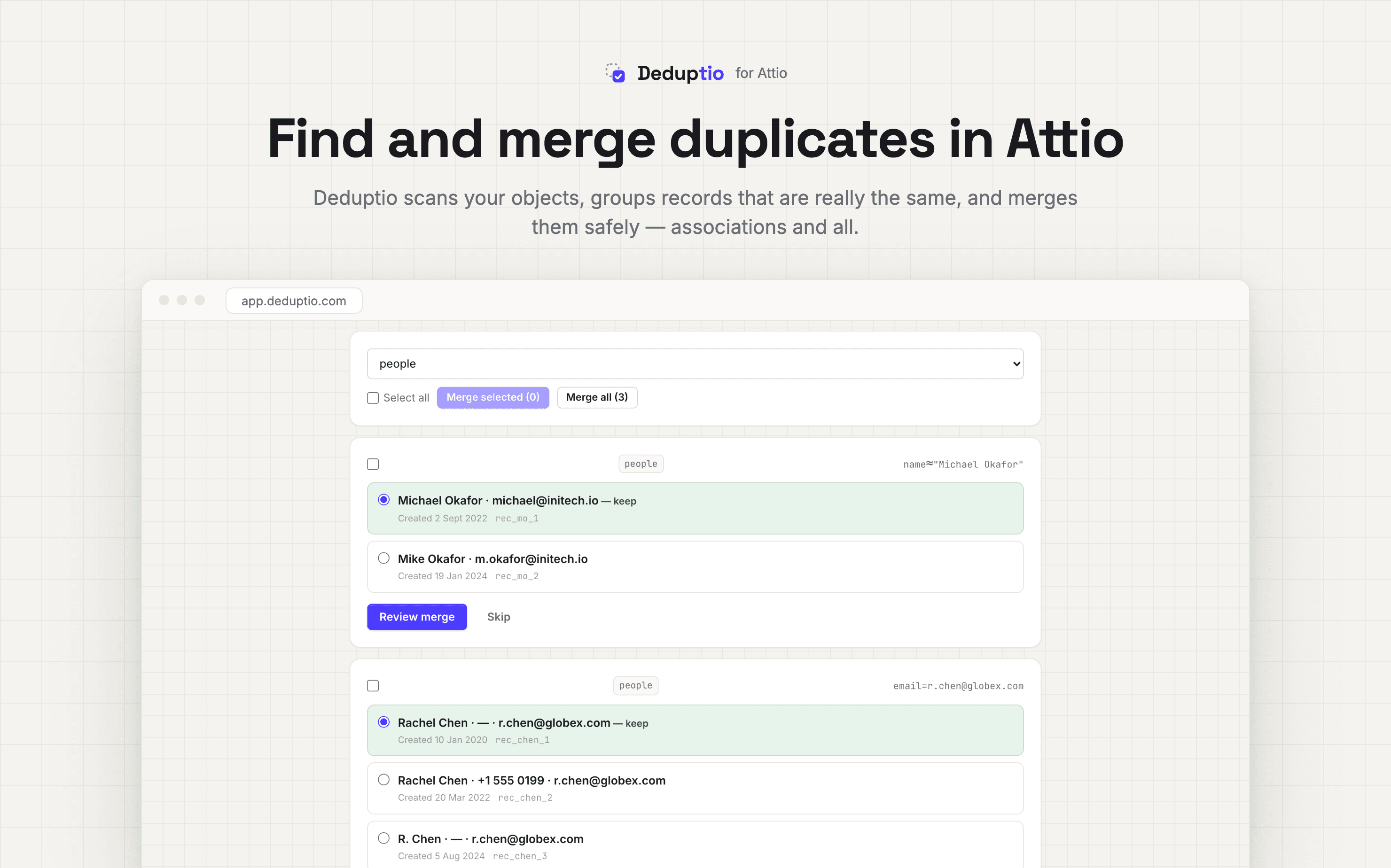
Deduptio connects to Attio through OAuth and lets you configure match rules per object. Rules can use exact or fuzzy comparison, any attribute, relationships, and AND/OR logic. Scans group candidates and show why they matched without changing the workspace.
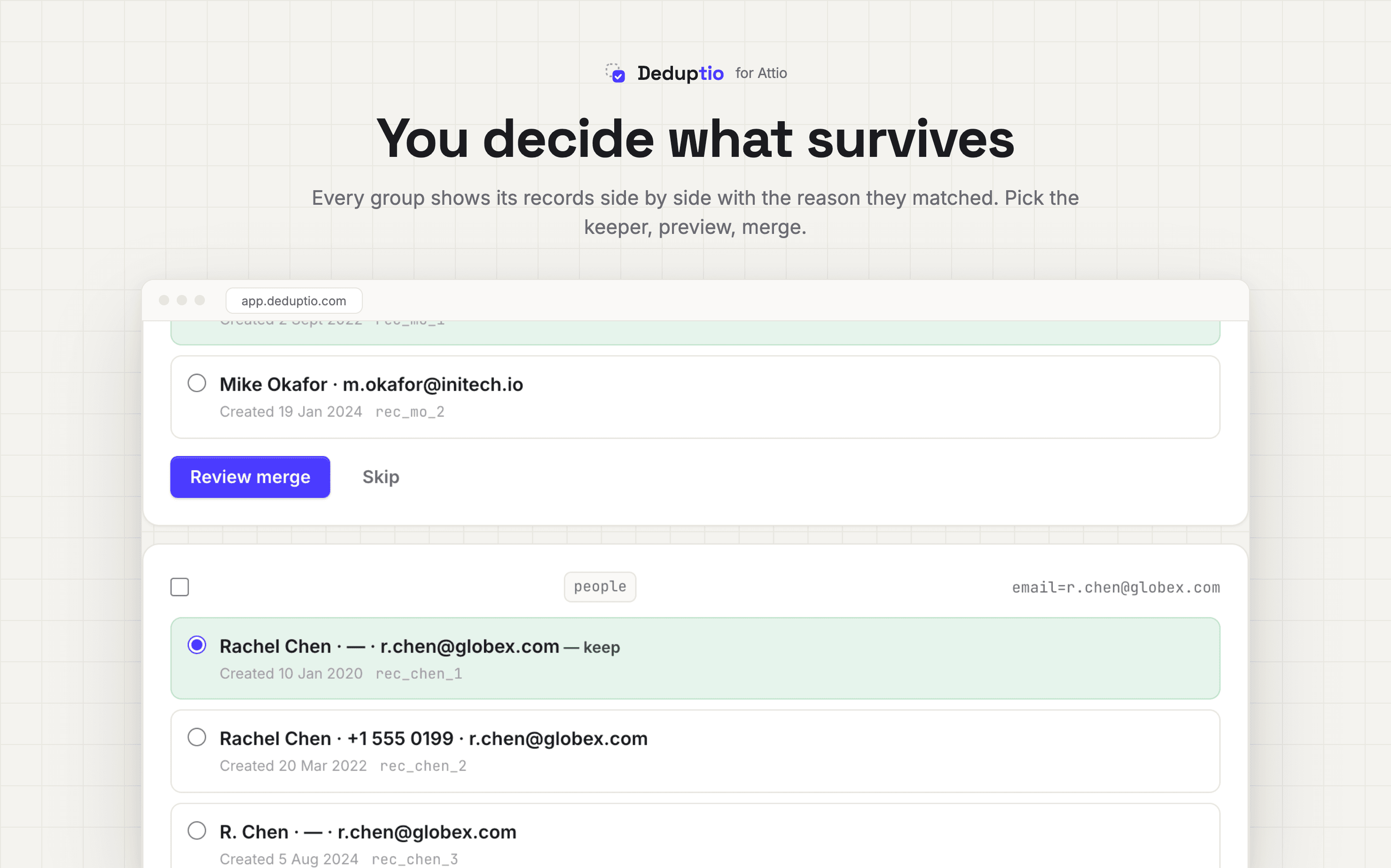
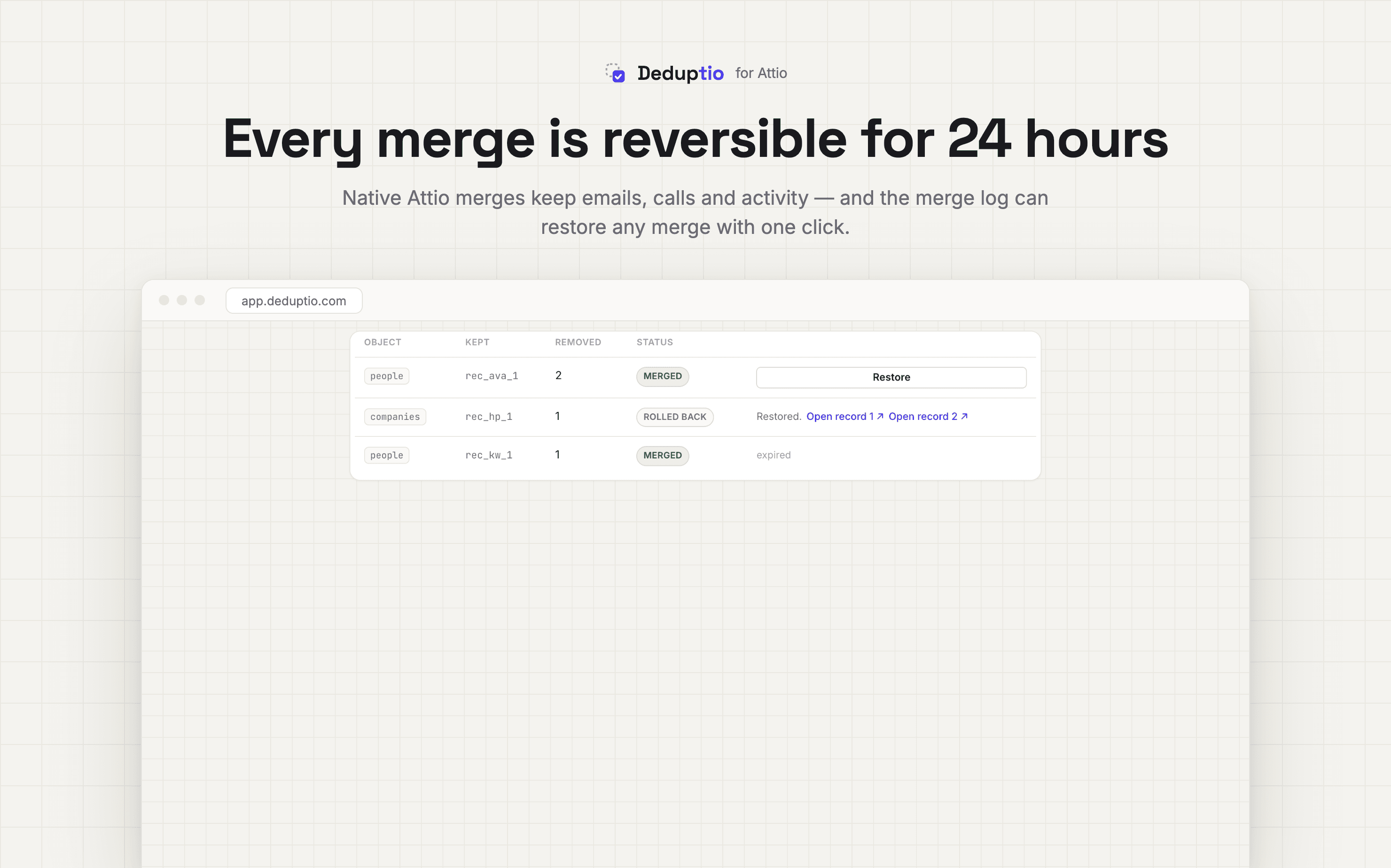
During review, you choose the surviving record and preview the result. Approved groups are merged using Attio-native record merging so activities and references follow the survivor. Every live merge is snapshotted and can be rolled back for 24 hours. You can review groups individually or merge an approved set in bulk.
- Configure rules and run scans
- Review and merge duplicate groups
- Clean duplicate list entries
- Understand rollback and safety
- Compare plans and limits
Product evidence: the workflow in Deduptio
These are current product screenshots, not conceptual mockups. They show the review, survivor-selection, and recovery steps described above.
Sources and verification
Product behavior was rechecked on September 4, 2026. Attio claims below use Attio's own documentation; Deduptio claims link to the product documentation that defines the shipped behavior.
- Attio Help Center: merge and delete records — native detection, two-record merging, supported objects, survivor behavior, and deletion.
- Attio REST API reference — the record query, assert, and merge endpoints used by integrations.
- Deduptio in Attio's app directory — independent confirmation that the product is an Attio integration.
- Rules and scanning, merging, and rollback — the exact Deduptio behavior, limits, and recovery semantics.
See what is duplicated before changing anything
Connect an Attio workspace, configure the first rule, and run a dry scan. You can inspect every group and match reason before approving a merge.
Start a free Attio duplicate scanFrequently asked questions
Does Attio automatically prevent duplicate records?
Attio can identify common duplicate People by email and Companies by domain, but duplicates still appear when identifying values are absent, inconsistent, or genuinely different. Imports, integrations, alternate domains, spelling variations, and custom objects usually need additional rules and review.
What is the safest way to deduplicate Attio?
Start with exact high-confidence rules, run a dry scan, review ambiguous groups, choose the most complete and connected record as the survivor, preview the merge, and verify activities, relationships, and list entries afterward. Keep a rollback or backup path for live changes.
Can Attio duplicates be merged in bulk?
Attio's interface is designed primarily for reviewing and merging records manually. Deduptio adds grouped review and bulk merging while using Attio-native record merges, with a snapshot and 24-hour rollback for every merge.
Which fields should be used to find Attio duplicates?
For People, start with email, phone, LinkedIn URL, and name plus company. For Companies, use domain, normalized company name, and verified social URLs. For Deals and custom objects, use stable business identifiers and relationships rather than names alone.